Getting Started
This will show you how to set up AutoHotKey development environment and how to integrate the library into your keybinder script.
This library supports Windows and AutoHotKey v1.1 ANSI 32-bit only. There's no guarantee that this works under Linux with any Windows emulator.
Installing AutoHotKey v1.1
You can download the latest AutoHotKey v1.1 on their official homepage. Make sure to click on Download v1.1 (deprecated) as this library does not support AHK > v1.1.
Then, when running the installer, make sure to select ANSI 32-bit.
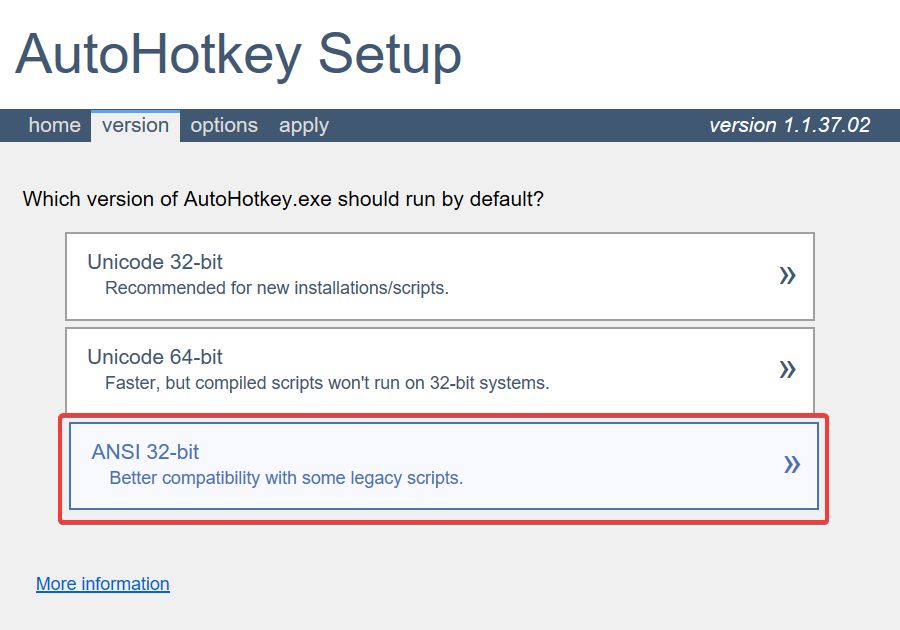
When the installer completes, you're pretty much good to go! When working on your scripts, make sure to use Windows 1252 (or Cp1252) encoding.
It's not guaranteed that the library works with Unicodes/UTF-8 encodings.
IDE Setup
Some people tend to use SciTE4AutoHotkey for AutoHotKey development.
I used Visual Studio Code with AHK++ plugin for development which works out quite well for me.
If you're interested in the same setup, you can take a look at .vscode/ folder for recommended
extensions (though not every extension is needed for you).
In the end, pick whatever you're comfortable with. 😄
Downloading 'SA:MP UDF for AutoHotkey v1.1'
Latest Release
If you want to use the latest released version, you can download SAMP.ahk by going to this GitHub Repository and selecting the latest release under section "Release" in the sidebar on the right-hand side.
Latest Development
While we try to maintain working revisions of SAMP.ahk on main branch, it will contain bleeding edge that may not have been released yet. If you still want to opt for that version, you can simply download SAMP.ahk from the main branch.
Creating Your First AHK Script
Create a new AHK file and make sure you place SAMP.ahk next to your AHK file.
Then, you can include SAMP.ahk by adding #include %A_ScriptDir%\SAMP.ahk at the top of your AHK file. A minimal working example may look like this:
SendMode Input
SetWorkingDir %A_ScriptDir%
#Warn
#UseHook
#NoEnv
#SingleInstance force
#include %A_ScriptDir%\SAMP.ahk

Hotkey, Enter, Off
Hotkey, Escape, Off
return

; Make sure to toggle 'T' key (SA:MP chat window hotkey)
; so we don't trigger any of our keybindings accidentally
+T::
~t::
Suspend On
Hotkey, Enter, On
Hotkey, Escape, On
Hotkey, t, Off
return

~NumpadEnter::
~Enter::
Suspend Permit
Suspend Off
Hotkey, t, On
Hotkey, Enter, Off
Hotkey, Escape, Off
return

~Escape::
Suspend Permit
Suspend Off
Hotkey, t, On
Hotkey, Enter, Off
Hotkey, Escape, Off
return

Numpad1::
AddChatMessage("{FFFFF}Hello, World!")
return
You can also take a look at TestKeybinder.ahk which contains a more advanced implementation and usage of SAMP.ahk.